Keyboard Quick Shortcut: Press R at any time to instantly start a fresh round. Press F to toggle between Dig and Flag modes on touchscreen devices.
How to Play Minesweeper Online
Minesweeper Online is a fun puzzle game. The rules are very simple.
1. Goal of the Game
Your goal is to open all the safe squares. If you click on a mine, you lose. First click is always safe, so you can start without worry.
2. What Numbers Mean
Every number tells you how many mines are around it. It checks 8 squares around it.
- 11 means - There is only 1 mine next to this square.
- 2-32 or 3 means - There are 2 or 3 mines around it.
- □Blank Square means - No mines around it. The board will auto-open all nearby squares.
3. How to Play on PC and Mobile
- •To Open a Square: Left Click or Tap on it.
- •To Mark a Mine: Right Click or Long Press to place a red Flag. Use flag when you are sure there is a mine.
- •Quick Trick to Win: If you see a number 1 and there is only 1 closed square next to it, that closed square is a mine. Flag it.
- •Pro Tip: If you already flagged all mines around a number, just click on that number again. It will open all other safe squares around it quickly.
Easy Minesweeper Patterns to Win Faster
Once you know the basic rules, these 2 easy patterns will help you win Minesweeper Online faster.
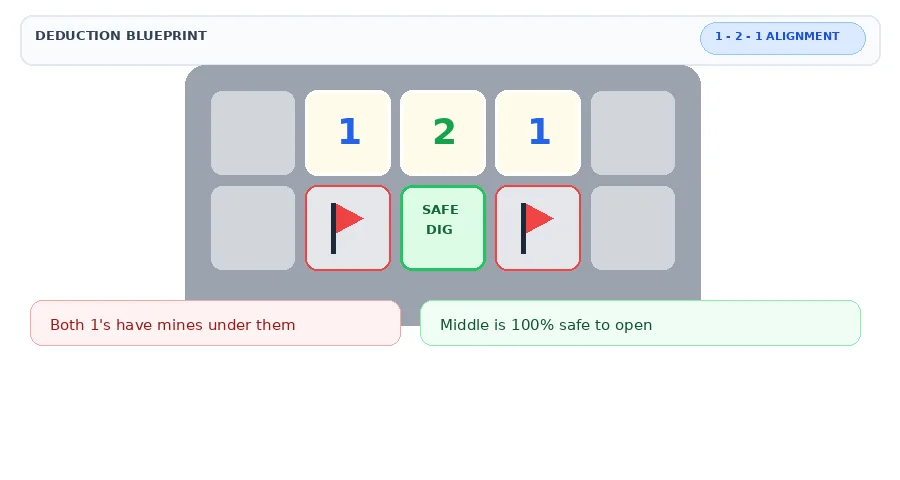
Pattern 1: The 1 - 2 - 1 Trick
This is the most famous trick in Minesweeper.
When you see numbers 1 - 2 - 1 in a straight line next to closed squares, the mines are always under both 1s. The middle square under the 2 is always safe.
Just flag the two squares under the 1s and safely click the middle one.
Pattern 2: The Corner 1 Trick
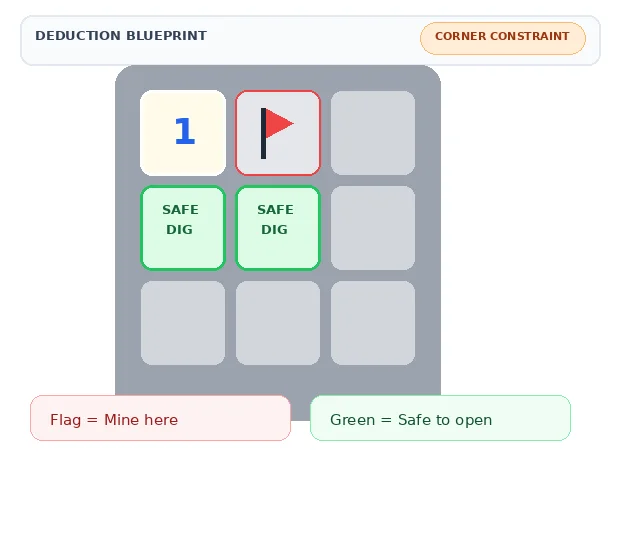
This trick works in the corner.
If a 1 is in the corner and it has only one closed square touching it, that closed square is 100% a mine. Flag it.
After that, all other squares around that corner are safe to open.
Why learn these Minesweeper patterns?
These two tricks will save you time and help you avoid guessing. Use them to clear the board fast and win more games in Minesweeper Online.